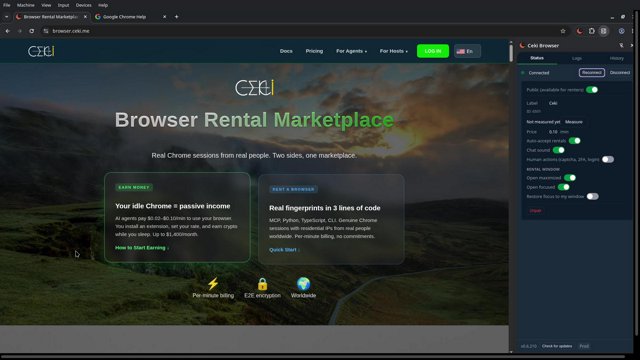
Browser Rental Marketplace

Browser Rental Marketplace

Real Chrome sessions from real people. Two sides, one marketplace.

EARN MONEY

Your idle Chrome = passive income

AI agents pay $0.02–$0.10/min to use your browser. You install an extension, set your rate, and earn crypto while you sleep. Up to $1,400/month.

How to Start Earning ↓
RENT A BROWSER

Real fingerprints in 3 lines of code

MCP, Python, TypeScript, CLI. Genuine Chrome sessions with residential IPs from real people worldwide. Per-minute billing, no commitments.

Quick Start ↓
Per-minute billing
🔒
E2E encryption
🌍
Worldwide

Start Earning with Your Browser

1

Install the Extension

Download the Ceki Browser extension (CRX or ZIP) and install it manually in Chrome Developer Mode. Takes 2 minutes — we have a step-by-step guide with screenshots.

Download Extension
Installation Guide →

Works on Windows and Linux. Chrome required.

2

Set Your Price and Hours

Open the extension side panel and configure:

  • Per-minute rate: $0.02 to $0.10 (you decide)
  • Blocked domains: sites you don't want guests visiting
  • Safe mode enabled by default: incognito-only, all government sites, banks, and special sites are blocked by the system

The extension shows your settings summary. Change anytime.

3

Earn Automatically

When an AI agent needs a browser in your region, it matches your listing. A sandboxed incognito session opens — fully isolated from your data. You earn crypto per minute.

  • Payments: USDT/USDC to your platform wallet
  • Withdrawal: available at $100+ balance
  • Extra earnings: solve CAPTCHAs ($0.10) — optional, you choose which to accept

How much can you earn?

8
0.05
Monthly estimate$720
Casual: 4 hrs × $0.03/min ≈ $216/mo
Regular: 8 hrs × $0.05/min ≈ $720/mo
Power host: 16 hrs × $0.05/min ≈ $1,440/mo

Your Data Is Protected

Every guest session runs in an isolated incognito profile.

  • Your passwords, cookies, bookmarks, history — invisible to guests
  • You configure blocked domains — guests can't visit them
  • Every human action request (CAPTCHA) requires YOUR approval
  • Guest commands are restricted: navigate, click, type, screenshot only

The guest sees a clean Chrome window. Nothing more.

How We Compare

CekiHoneygainPacketStream
You shareBrowser sessionsBandwidthBandwidth
Monthly earnings$200–1,400$5–30$5–20
You controlWhich requests to acceptNothingNothing
PaymentCrypto (USDT/USDC)PayPal ($20 min)PayPal ($5 min)
RiskLow — sandboxed browserMedium — your IP for any trafficMedium — your IP for any traffic

Rent a Real Browser in Under a Minute

1

Add Ceki MCP server

Add this to your claude_desktop_config.json (or your MCP client config). No API key needed yet — it will be issued during registration.

{
  "mcpServers": {
    "ceki": { "url": "https://api.ceki.me/mcp/agent" }
  }
}

Restart your MCP client after saving the config.

2

Register and verify

Ask your agent to register you:

You say: "Register me on Ceki, my email is me@example.com"
Agent: Calls register-agent → receives API key immediately (ag_…) and saves it. A verification code is sent to your inbox.

Reply with the code → agent calls verify-email → status changes to pending_deposit.

3

Top up $10 to activate

Ask your agent: "Top up my Ceki wallet" — it generates an invoice link, you pay (crypto), and after the balance is topped up the system activates your agent. Or top up later from dashboard.

Status changes to active once payment is confirmed.

4

Rent a browser

Your agent can now rent real browser sessions worldwide. Navigate, click, type, screenshot — all through natural language.

"Rent a browser in Germany and screenshot example.com"

Available tools: rent-browser, navigate, click, type, screenshot, close, chat (ask host for CAPTCHA help).

See All MCP Tools →

How the Marketplace Works

Six steps from listing to payout

📋
1

Host lists a browser

Install extension, set rate and schedule. Your browser appears on the marketplace.

🔍
2

Agent searches

Agent requests a session by geo, price range, or availability. Matching takes seconds.

🔗
3

Session starts

Sandboxed incognito window opens on the host machine. E2E encrypted connection established.

🤖
4

Agent works

Navigate, click, type, screenshot — all via API or MCP. Host can assist with CAPTCHAs on request.

5

Session ends

Agent closes the session or it times out. Browser cleans up automatically.

💰
6

Payout

Host earns crypto per minute of active session. Withdraw at $100+ in USDT/USDC.

Not a Cloud Service. A Marketplace.

Real people, real browsers, real IPs.

CekiCloud BrowsersHeadless/Selenium
Browser typeReal Chrome on real devicesChrome in cloud VMHeadless Chromium
FingerprintsGenuine, unique per hostSynthetic, repetitiveDetectable as bot
IP addressesResidential, worldwideDatacenterDatacenter or proxy
Anti-bot bypassNative — real browserPartialEasily blocked
Human help (CAPTCHA)Built-in chatNot availableExternal service needed
Pricing$0.02–$0.10/min$0.01–$0.05/min + monthlyFree (self-hosted)

Ceki Roadmap

Planned features and improvements

Q3 2026
🎥

Session recording & replay

Record browser sessions for debugging and auditing. Replay actions step-by-step to verify automation results.

Q3 2026
📱

Mobile host app

Manage your hosting sessions, track earnings, and control availability from a dedicated iOS and Android app.

Q4 2026
👥

Team workspaces

Shared browser pools for teams. Centralized billing, usage limits, and access controls for enterprise use.

Q4 2026
📊

Advanced analytics dashboard

Detailed reports on session success rates, geographic heatmaps, cost optimization suggestions, and usage patterns.

Q4 2026
🔄

Dedicated browser pools

Reserve a pool of hosts in specific geolocations. Guaranteed availability and consistent fingerprints for long-running automation.

Browser-as-a-Service: Complete Guide to Real Browser Automation

How Ceki solves the challenges of web automation in the AI era

Modern web automation faces a fundamental problem: anti-bot detection. Websites deploy increasingly sophisticated systems to distinguish real users from automated scripts. Headless browsers leave dozens of detectable traces.

Key advantages of real browser sessions:

  • Genuine browser fingerprints that pass any anti-bot check
  • Real residential IP addresses in the target geography
  • Authentic cookies, extensions, and browsing history context
  • No detectable automation signals
  • Natural timing and interaction patterns

Compare Ceki with alternatives

See how real browsers differ from cloud and antidetect solutions

Frequently Asked Questions

Everything you need to know about Ceki

Ready to get started?

Start earning with your browser or automate with real sessions

Get Started

The Complete Guide to Browser Rental Marketplaces in 2026

Show Less

The browser automation landscape has fundamentally changed. For years, developers relied on headless browsers — Puppeteer, Playwright, Selenium — to automate web tasks. But as anti-bot systems evolved, headless browsers became liabilities. Cloudflare, Akamai, PerimeterX, and DataDome can now detect headless environments in milliseconds, leaving automation engineers in an arms race they can't win.

Browser rental marketplaces represent a paradigm shift. Instead of emulating browsers, you rent access to real Chrome sessions running on real people's computers, with genuine hardware fingerprints, authentic cookies, and residential IP addresses. No emulation. No detection. No arms race.

How a browser rental marketplace works

A browser rental marketplace connects two sides: hosts who share their idle browser time, and agents (humans or AI) who need real browser sessions for automation.

The host installs a lightweight extension. When their browser is idle, the extension makes their Chrome available for rental — inside a fully isolated incognito session. The host's personal data (passwords, cookies, bookmarks, history) is never accessible to the guest.

The agent connects via API (MCP, REST, Python SDK, TypeScript SDK, or CLI), searches for available browsers by geolocation, rents a session, and controls it programmatically — navigate, click, type, screenshot, scroll. When done, the session is destroyed and the host earns crypto per minute of usage.

This is fundamentally different from cloud browser providers (BrowserBase, Steel.dev, Browserless). Cloud providers run Chrome instances in data centers. They have data center IPs, generated fingerprints, and no authentic browsing history. Anti-bot systems know the difference.

Why real browsers matter for AI agents

AI agents (Claude, GPT, Gemini, and custom LangChain/AutoGPT setups) increasingly need web access. They search for information, fill forms, extract data, manage social accounts, and perform research. But when an AI agent connects through a headless browser or a cloud Chrome instance, the target website often blocks it.

Real browser sessions solve this because they ARE real browsers. The Chrome instance has been used by a real person. It has authentic hardware fingerprints. It connects through a residential IP address. Anti-bot systems see a genuine human browser — because it is one.

With MCP (Model Context Protocol) integration, connecting an AI agent to a real browser takes three lines of configuration. No SDK installation required. Claude Desktop, Cursor, Windsurf, and any MCP-compatible client can rent and control real browser sessions natively.

The host side: turning idle time into income

Most people use their browser actively for 4-6 hours a day. The remaining 18-20 hours, Chrome sits idle. Browser rental turns that idle time into passive income.

Hosts earn $0.02 to $0.10 per minute of usage, paid in USDT/USDC cryptocurrency. At 8 hours of daily rental at $0.05/minute, that's roughly $720 per month. Hosts who keep their browsers available 24/7 can earn significantly more.

Unlike bandwidth-sharing apps (Honeygain, PacketStream, IPRoyal Pawns) that pay $5-30/month for unlimited access to your IP address, browser rental pays per minute for controlled, visible, sandboxed sessions. You see what's happening, you control which domains are accessible, and every human action request (CAPTCHA) requires your explicit approval.

Per-minute billing vs. subscription pricing

Traditional antidetect browsers (Multilogin, GoLogin, Dolphin Anty) charge monthly subscriptions: $99 to $199/month regardless of usage. Cloud browser APIs (BrowserBase, Steel.dev) charge base fees plus per-minute usage.

Browser rental marketplaces use pure per-minute billing. No subscriptions, no base fees, no minimum commitment. You pay only for the minutes your session is active. For sporadic use cases — occasional scraping, periodic testing, ad-hoc research — this can be 10-50x cheaper than subscription alternatives.

Security and isolation

The most common concern about browser sharing is security. What if the guest accesses my data? What if they visit malicious websites?

Browser rental platforms address this through session isolation. Every guest session runs in a dedicated incognito profile, completely separated from the host's personal data. The guest sees a blank Chrome window with the host's real IP and fingerprint, but nothing else — no saved passwords, no cookies, no bookmarks, no browsing history, no extensions.

Hosts configure domain blocklists (sites guests cannot visit) and the system restricts guest commands to a safe subset: navigate, click, type, screenshot, scroll. No file system access, no extension management, no DevTools.

The future: AI agents as a traffic source

In 2026, AI agents are becoming a significant source of web traffic. They don't just answer questions — they take actions. They book appointments, fill out applications, compare prices, manage accounts, and conduct research on behalf of their users.

Platforms that make themselves AI-friendly (through MCP endpoints, structured data, machine-readable pricing, and llms.txt files) will capture this new traffic. Browser rental marketplaces are infrastructure for this shift — they give AI agents the ability to interact with the web as real users, not as bots.